Checkbox & Toggle
Checkbox and Toggle both store a boolean. Checkbox has a Multiple mode on top of that, which turns it into a group of boxes and stores an array of the ticked choices. Toggle has no such mode.


Control Settings
Checkbox
- Alongside Text (
alongside_text) - the label printed beside the box, hidden while Multiple is on - Checked by default (
checked) - the state a newly inserted block starts in, off by default - Multiple (
multiple) - off by default. Replaces the single box with one box per choice, hides Alongside Text and the default checkbox, and puts Choices and Output Format in their place - Choices (
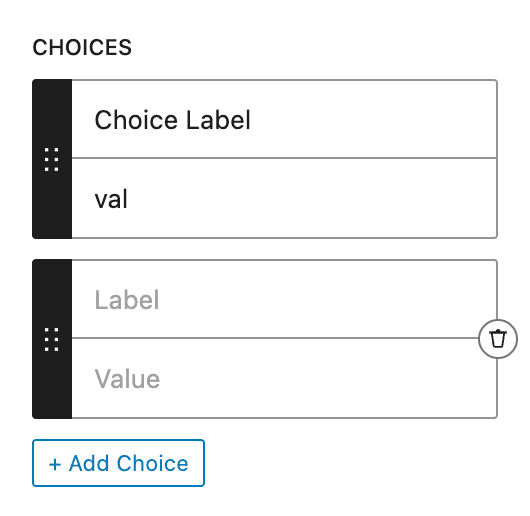
choices) - aLabeland aValuefor each box, dragged into order by the handle and added with + Add Choice. With Multiple on and no choices, the control renders nothing in the block editor - Output Format (
output_format) - what a ticked box contributes to the saved array.Valueis the default,Labelstores the label in place of the value, andBoth (Array)stores the two together
Toggle
- Alongside Text (
alongside_text) - the label printed beside the toggle - Checked (
checked) - the state a newly inserted block starts in, off by default
Toggle has those two settings and nothing else. There is no Multiple, no Choices and no Output Format, so a group of options needs the Checkbox control, Select or Radio.
Usage
Single Checkbox/Toggle
<?php if ( $attributes['control_name'] ) : ?>
  <p>The value is True</p>
<?php else: ?>
  <p>The value is False</p>
<?php endif; ?>{{#if control_name}}
<p>The value is True</p>
{{else}}
<p>The value is False</p>
{{/if}}Multiple Checkboxes
<?php
// Returns array of selected values
foreach ( $attributes['control_name'] as $value ) {
    echo '<p>' . esc_html( $value ) . '</p>';
}
?><?php
// Returns array of selected labels
foreach ( $attributes['control_name'] as $label ) {
echo '<p>' . esc_html( $label ) . '</p>';
}
?><?php
// Returns array of arrays with value and label
foreach ( $attributes['control_name'] as $choice ) {
echo '<p>Value: ' . esc_html( $choice['value'] ) . '</p>';
echo '<p>Label: ' . esc_html( $choice['label'] ) . '</p>';
}
?>{{#each control_name}}
<p>{{this}}</p>
{{/each}}{{#each control_name}}
<p>{{this}}</p>
{{/each}}{{#each control_name}}
<p>Value: {{this.value}}</p>
<p>Label: {{this.label}}</p>
{{/each}}Post Meta
<?php if ( get_lzb_meta( 'control_meta_name' ) ) : ?>
  <p>The value is True</p>
<?php else: ?>
  <p>The value is False</p>
<?php endif; ?><?php
$selected_choices = get_lzb_meta( 'control_meta_name' );
// Output depends on selected Output Format
foreach ( $selected_choices as $choice ) {
echo '<p>' . esc_html( $choice ) . '</p>';
}
?>With Multiple on, the Checkbox control returns an array of the ticked choices. The format of the array items depends on the Output Format setting.